November 7th, 2025
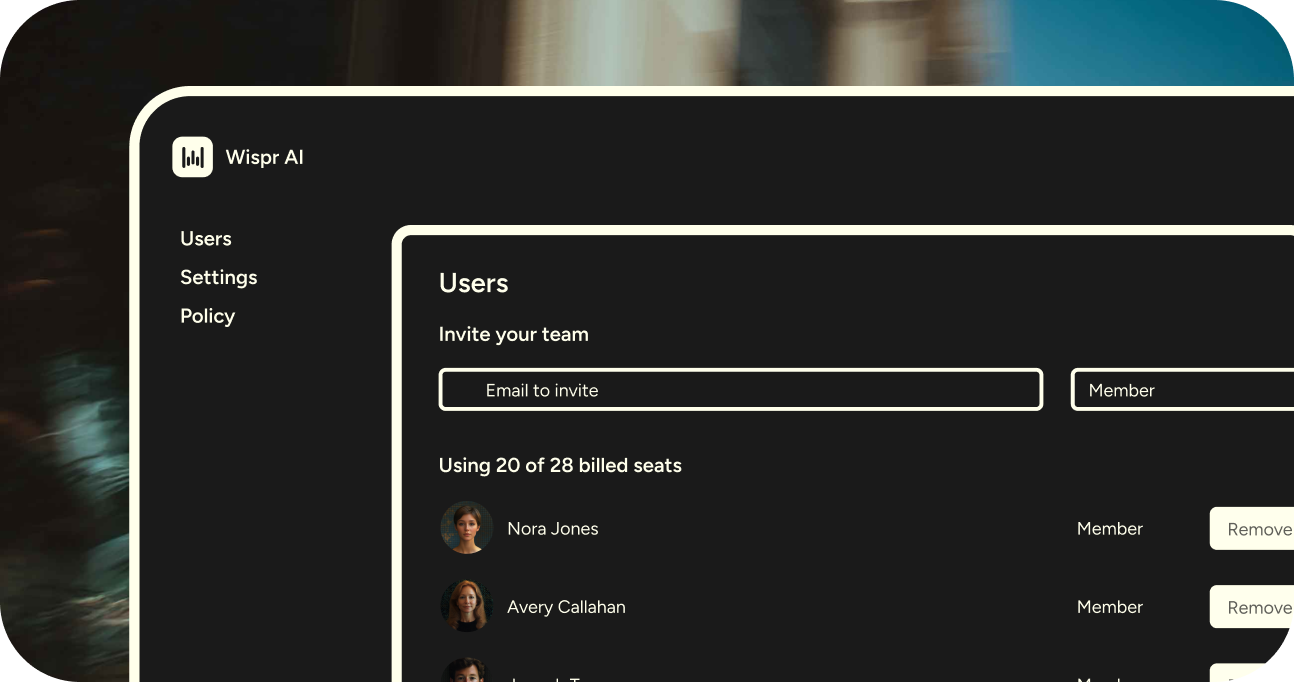
Flow Pro has been restructured to make it easier than ever for teams to start using Wispr Flow together.
Every teammate you invite now receives a 14-day Flow Pro trial, with no upfront payment, no seat minimums, and no domain restrictions.
Before
Previously, Flow’s plans were split into four tiers:
Flow Basic: for individual users whose 14-day free trial of Flow Pro had ran out
Flow Pro: for individual users who need unlimited dictation, priority support, and/or early access to new features
Flow Teams: required upfront payment, a minimum of 3 seats, and no free trials for new teammates.
Flow Enterprise: for organizations needing advanced compliance and SSO/SAML.
This structure made it harder for smaller or fast-moving teams to experiment with Flow collaboratively before committing.
Now
Flow Pro now supports both individuals and teams, combining flexibility with simplicity:
Free 14-day Pro trials for every invited teammate, even if they’ve already tried Pro as an individual
No upfront payment required to add members or start a team
No seat minimums: teams can start with one member and scale naturally
(Coming Soon) Usage dashboards for team admins to track usage by week and by website. Advanced usage stats for enterprise accounts only.
And as always, we offer:
No domain restrictions: invite teammates using work or personal emails (limited to one team per domain, except for consumer domains such as @gmail.com).
Centralized billing and admin controls for easy team management.
Shared Snippets and Dictionaries
These changes make Flow adoption frictionless, letting teams collaborate in real workflows before deciding to upgrade together.
Flow Enterprise
Flow Enterprise remains available for larger organizations or teams with advanced compliance needs, including:
SOC 2 Type II and ISO 27001 compliance
Enforced HIPAA and Zero Data Retention
SSO/SAML integration
Bulk pricing
Advanced usage dashboards (coming soon)
Teams can start on Flow Pro and upgrade seamlessly when additional security or administrative controls are required.
Learn more about Flow for Business and get started with your team today.
October 29th, 2025
New

Previously, Flow automatically formatted your text differently depending on whether you were in an email app or a messaging app. In emails, Flow used full punctuation, capitalization, and line breaks to look polished. In messaging apps, Flow made things a bit lighter and more casual.
That worked fine for most people, but it didn’t always reflect your personal writing style.
Now with Personalized Style, you now decide how Flow formats your text based on the type of app, so you always sound like you.
Choose your preferred formatting for each type of app:
Personal messaging apps (iMessage, WhatsApp, Telegram)
Work messaging apps (Slack, Teams)
Email apps (Gmail, Outlook, Superhuman)
Other apps (Docs, Notes, ChatGPT, etc.)
Depending on the app category, you’ll be able to choose from Very Casual, Casual, Excited, or Formal. Flow will automatically apply your chosen punctuation and capitalization whenever you dictate. However, your words stay yours: Flow won't alter your grammar, phrasing, or word choice.

To try it out, open your Flow Desktop app and go to Style from your lefthand navigation.
Note: This feature is currently only available on Desktop, coming soon to iPhone. In the interim, there's a simpler version called Casual tone while messaging under Settings → Personalization.
August 28th, 2025
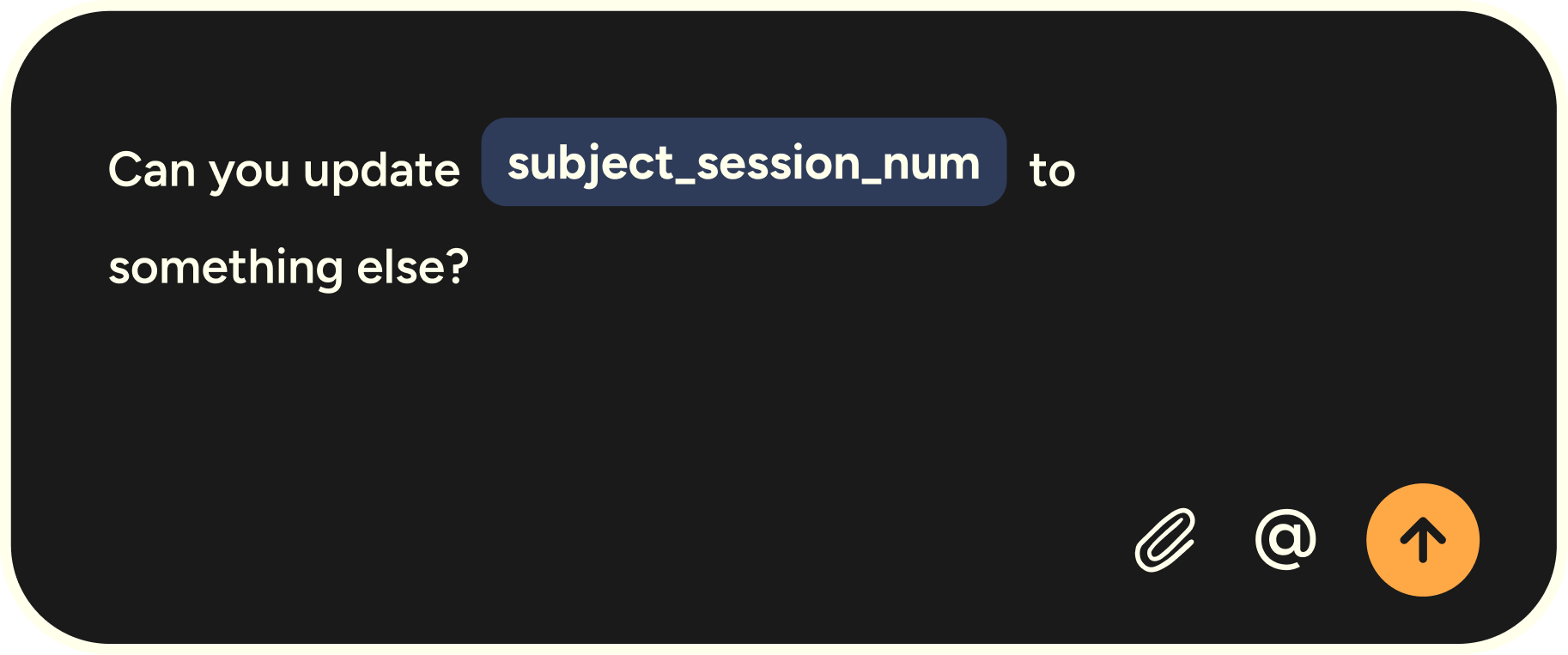
Flow just got even sharper for developers working in Cursor, Windsurf, GitHub, and more.
Variable Recognition (new)
Dictation used to stumble on variables, acronyms, and commands. Not anymore. Flow now parses your speech with full syntax awareness:
Handles camelCase, snake_case, and acronyms
Preserves exact spacing and formatting
Understands CLI commands and dev jargon
Example: say “SSH into EC2, tail the logs in tmux, and grep the timestamp” — Flow captures it precisely.
File Tagging (already live)
Mention a filename (e.g. authCheck.ts) and Flow automatically tags it in Cursor and Windsurf. Your spoken prompts become more complete, so AI agents return more precise results.
Why it matters: Together, Variable Recognition + File Tagging remove the biggest friction in voice coding. You can speak naturally and trust Flow to handle both your ideas and your syntax.
How to get started:
Update to the latest version of the Flow desktop app.
File Tagging is on by default (Settings → Vibe Coding if you’d like to turn it off).
Variable Recognition works automatically in GitHub, terminals, and Notion. In Cursor/Windsurf, enable it via Settings → Vibe Coding → Variable Recognition.
Try saying: “Fix the auth bug in authCheck.ts, variable isLoginError is false by default.” Flow tags the file, recognizes the variable, and upgrades your prompt — all hands-free.
August 19th, 2025
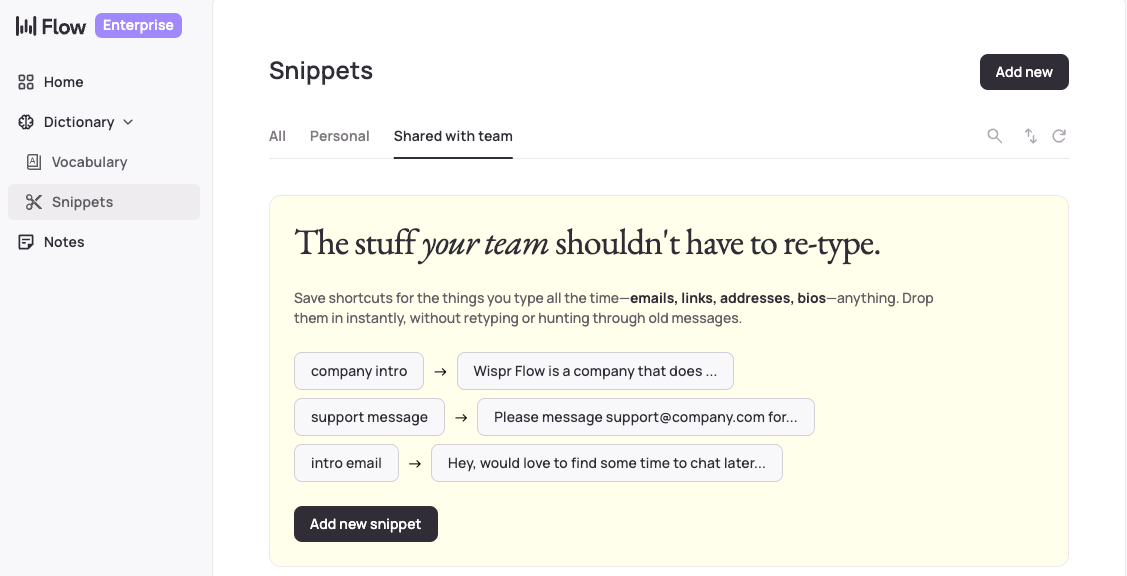
Flow for Business just got three major updates that transform it from individual productivity hack to team superpower:
1) Team Dictionary lets you add your team’s names, jargon, and acronyms to a shared dictionary so that communication stays clean and consistent.

2) Team Snippets let you create voice shortcuts for the things your team says repeatedly, like scheduling links, customer follow-ups, and FAQs. Just say the word and Flow inserts the fully polished text.

See a full demo here:
3) Enterprise-grade security means you can Enforce Zero Data Retention, SOC 2 Type II, and HIPAA compliance for your entire team, with centralized billing and administration. (Advanced security features for Enterprise plans only.)

Learn more about Flow for Business and choose the right plan for you.
August 7th, 2025

Flow now supports HIPAA-compliant workflows across all plans and devices. Whether you're a healthcare professional handling patient data, a startup founder reviewing sensitive research, or anyone working with confidential information—you can dictate with enterprise-grade privacy protection.
Previously, HIPAA compliance was limited to Enterprise customers. Now it's available to everyone who needs it, from solo practitioners to large medical teams.
How to get started if you're an enterprise user:
Go to your admin dashboard
View and accept the Business Associate Agreement (BAA)
If you're an individual user:
Open the app on desktop or iOS
Click the settings button
Go to Data & Privacy Settings
View and accept the Business Associate Agreement (BAA)
Accepting the BAA will enable HIPAA compliance and turn on Privacy Mode, which ensures zero data retention—meaning none of your dictation data will ever be stored or used for model training by us or any third party.
Building on our SOC 2 Type II certification for Enterprise customers, HIPAA readiness extends our commitment to making security and privacy accessible to teams of every size. We now meet the compliance standards that power companies like Rippling and Superhuman, as well as the healthcare-grade protection that hospitals and clinics require.
July 31st, 2025
New
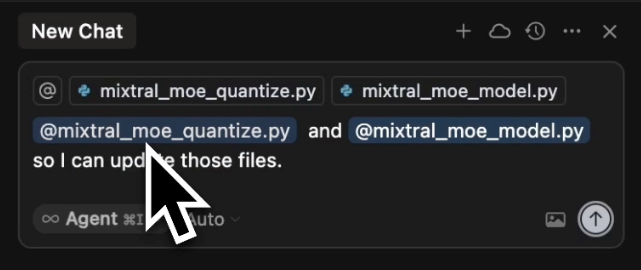
Flow now supports automatic file tagging through voice commands in Cursor and Windsurf. Simply say "I'm working with helloWorld.js" and Flow will automatically tag the relevant files in your workspace.
See it in action with our CTO:
Even if you're already using voice-first development with Flow, you have to go back to typing to tag files. Now you can stay in your voice workflow. No more stopping mid-thought to click around or hunt for files when you're deep in the zone.
This was our most requested feature—90% of user messages asked for voice file tagging. Our CEO Tanay recently wrote about why solving this problem matters so much to him as a founder and developer.
Coming Soon: More voice coding features are on the way. Stay tuned!
June 3rd, 2025
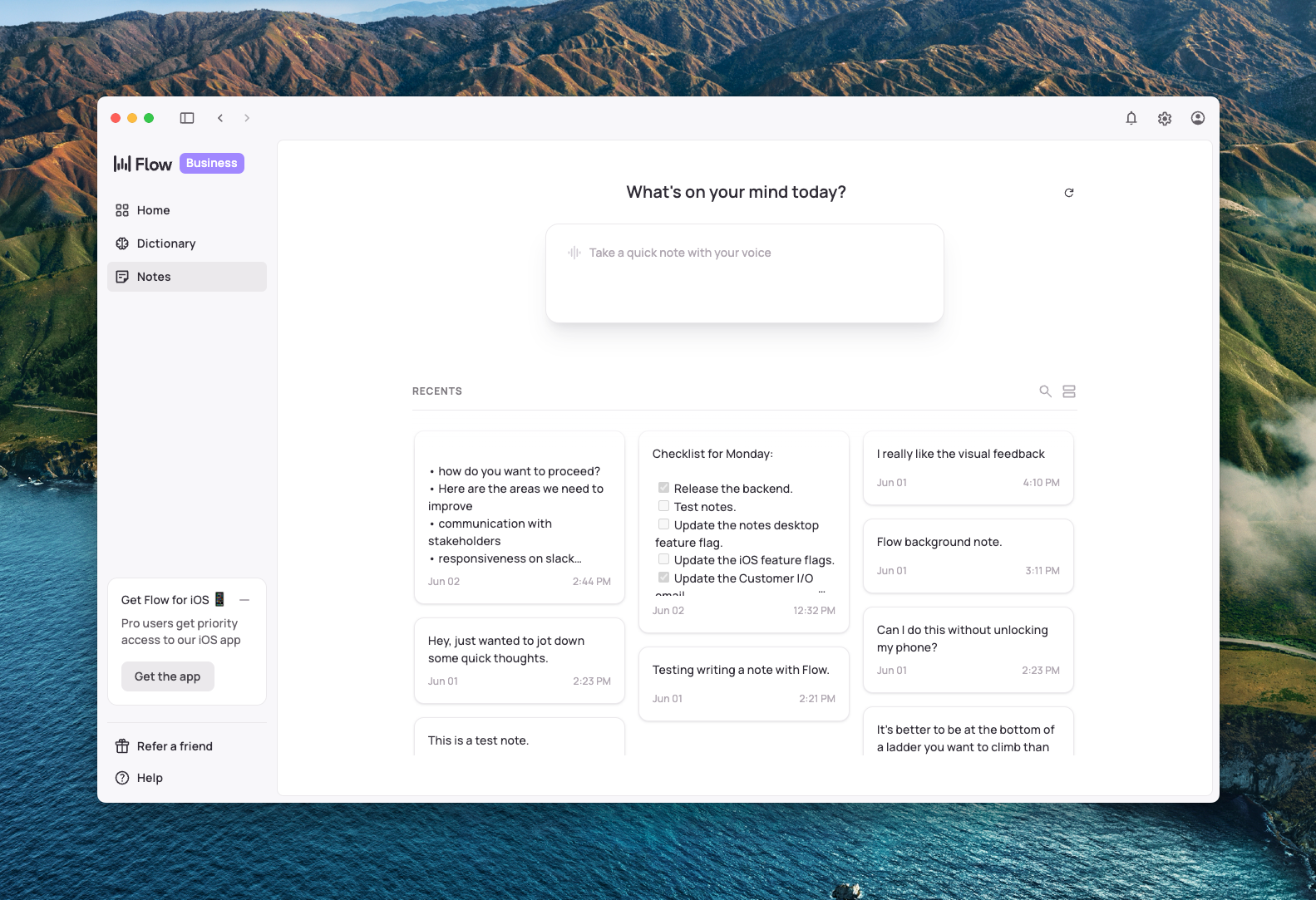
We've now brought Flow Notes to desktop and mobile! Capture thoughts on the go with Flow for iPhone, then access them anytime on desktop.
What makes this powerful:
Lightning-fast creation:
Register the “Take a Flow note” shortcut with your iPhone Action Button and take a note without even unlocking your phone!
Press Cmd+N inside the Flow desktop app to instantly create a new note
All your Flow magic: Every note benefits from Flow's transcription quality, dictionary, and formatting
Cross-platform sync: Take a note on your phone, edit and finish it on desktop (or vice versa)
Organized by default: Keep your thoughts structured and easily searchable
Whether you're brainstorming during your commute, taking meeting notes at your desk, or capturing late-night ideas, your notes now follow you everywhere. It's the same reliable Flow experience with a brand new use case.

... and more
This release, we also shipped:
Cleaner clipboard experience: Third-party clipboard manager users will no longer see Flow dictations cluttering their clipboard history.
Improved Windows reliability: We've made significant improvements to overall stability, especially for our Windows users. Flow now runs smoother and more consistently every day.
From the team 👋
Hey, I’m Faisal, and I built the Notes feature!
Fun fact about me: I learned how to speak Turkish by binge-watching a TV show way too many times.

May 9th, 2025
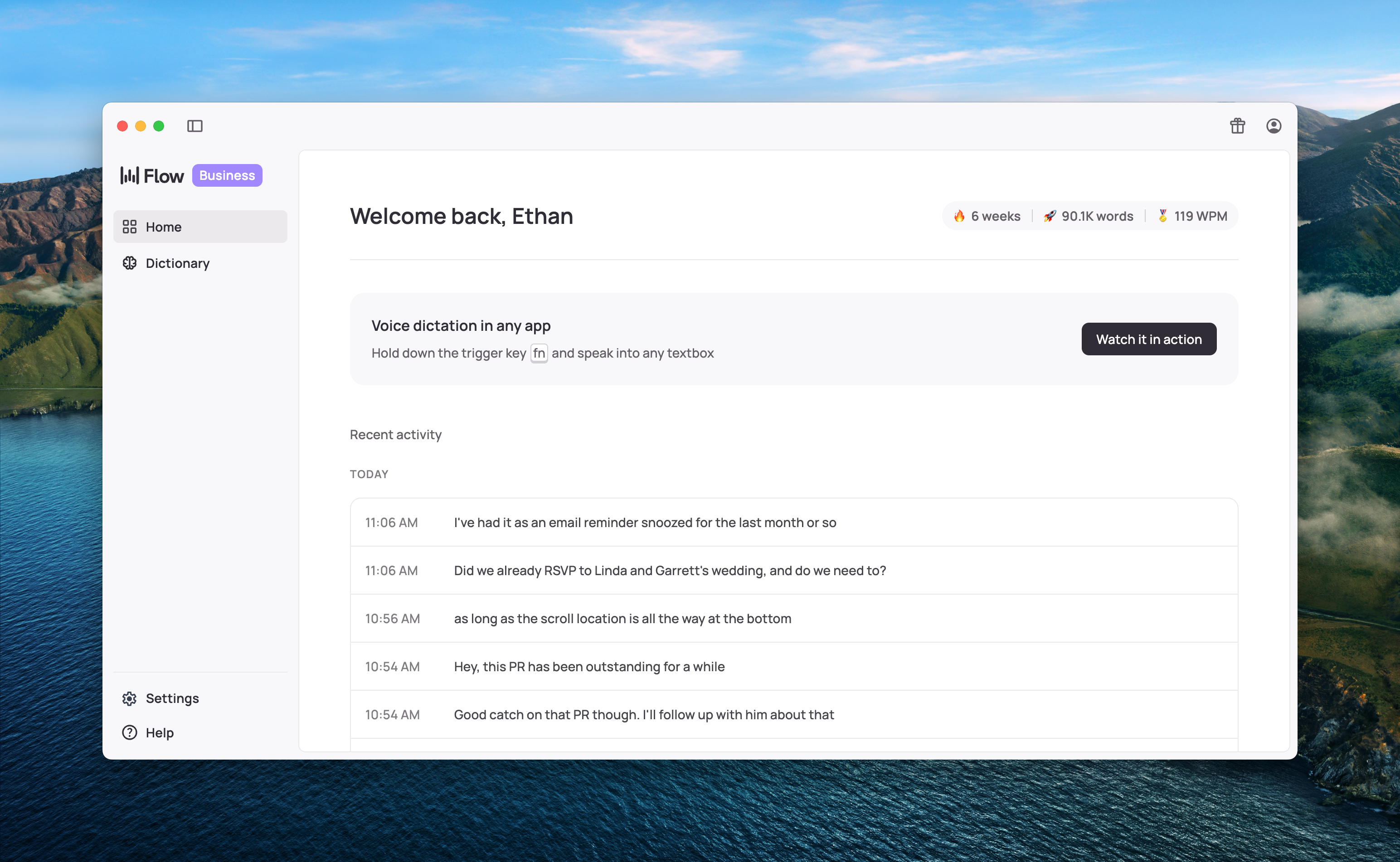
What's new and where to find it 👀
Don't worry – you'll still feel right at home, but here's what's changed:
History now lives directly on the main Home page – no more switching between tabs!
Dictionary word replacements are here! Need Flow to always change "c30” → “calendly.com/call/30-mins"? Now you can set that up in seconds!
See the status of your referrals and send referrals directly from within the app in the top right nav
Flow Home is now resizable and full screenable – with more responsiveness improvements on the way
Music lovers rejoice! Our "mute audio while dictating" setting is back and better than ever after some Apple-required reengineering
Try Flow on iOS! Text yourself a download link directly from the app or scan the QR code – App Store release coming very soon
Customize your "paste last text" command (previously Cmd+Ctrl+V) in Settings or the Help menu
Settings and Help have a new home in the bottom left corner, with a fresh new design
Your stats are now neatly tucked into a widget at the top of the Home page – just click to expand and see all your productivity wins 💪
As always, reliability remains our top priority – with special attention to our Windows users lately. Thank you to everyone who's helped us identify and squash bugs! 💜
Keep that feedback coming through the Help button. We're floored by how many of you rely on Flow every day.
March 18th, 2025

We put the Flow experience you love into an iOS keyboard — and just like the desktop app, you can use it across all your mobile apps.
Pro Users, to download Flow’s iOS Companion, see the link in your inbox.
Not a Flow Pro or Teams user yet? You can upgrade from your Hub.
😍 What can I use it for?
Our beta testers love using Flow — especially on a walk , in transit , or while multitasking. Their favorite use cases:
Emails
Slack
Texting
Quick notes
This is a beta version, so there might be hiccups. Let us know via email or the Slack community! We're making improvements every day.
Thanks for being on this journey with us!
March 12th, 2025

As one of the early users, you’ve helped shape Flow. As of today, we’ve officially launched Flow on both Mac and PC!
Can we have a minute of your day?
Support our Product Hunt launch
Retweet / comment / like our launch video on X
Like / repost our post on LinkedIn
It’s a small ask, but it helps us get closer to our goal—changing how people interact with technology.
Check your email or Flow Hub for your personal referral link. When your friends hit 2,000 words, you both get $15 in credits.
Thank you for being a part of Flow’s journey. We’ve got fun new features coming soon! We wouldn’t be here without you 💜